Is Learning to Code Still Worth It in 2026? An Honest Answer for the AI Era
AI can write code in seconds, so is learning to code still worth it? What the 2026 research actually shows, a spot-the-bug test, and a straight answer for career changers, hobbyists, students and parents.
An AI assistant can write a working function in seconds, so it’s a fair question: is learning to code worth it any more? We read the newest research available as of November 2026 to give you a straight answer, including the cases where the answer is no.
Short answer: for most people, yes, but the reason has shifted. AI makes code cheap to produce. It doesn’t make code correct, and someone still has to judge it. Learning to code is clearly worth it if you want to build things or work with data. It’s still worth it for a software career if you’re ready for a tougher entry-level market and a longer road. It’s probably not worth it if you need a guaranteed job within months, or you only need one small task done that an existing tool already does.
What the research shows (as of November 2026)
Confident predictions about AI and programming are everywhere. Measurements are rarer. These five recent sources measured something real, and each has limits worth knowing before you draw conclusions from it:
| Source | What it measured | What it found | What it doesn’t show |
|---|---|---|---|
| Stack Overflow Developer Survey 2026 | 30,903 valid responses from 169 countries, collected 23 June to 5 August 2026 from people reached through Stack Overflow’s own site, blog and email list | AI tools are part of everyday work. Asked when they trust AI output, the largest group (48% of the 14,304 who answered) said: when they can easily check it. | Views beyond Stack Overflow’s own audience, or whether AI actually makes anyone faster |
| GitHub Octoverse 2026 (28 October 2026) | GitHub’s own platform data | By September 2026, more than 40% of pull requests (proposed code changes) started with an AI agent’s first draft, up from 17% in March. | Whether that code is any good, or how many developers are employed |
| METR study and its February 2026 update | A randomised trial: 16 experienced open-source developers, 246 real tasks from their own projects, February to June 2025 | With AI tools allowed, tasks took 19% longer. Developers had expected a 24% speed-up, and afterwards still believed AI had sped them up by 20%. In 2026 METR called these results out of date: it thinks developers are probably faster with AI now, but says its newer data is too unreliable to say by how much. | That AI slows everyone down. METR says explicitly that it doesn’t show this. |
| Anthropic (29 January 2026) | A randomised trial: 52 mostly junior software engineers learning an unfamiliar Python library, with or without an AI assistant | On a quiz straight afterwards, the AI group averaged 50% and the hand-coding group 67%. The biggest gap was on debugging questions. The AI group’s small speed gain wasn’t statistically significant. | Long-term effects, or how complete beginners fare: everyone in it already used Python weekly. The sample is small, and the study was run by an AI company. |
| Stanford Digital Economy Lab, “Canaries in the Coal Mine?” (revised 12 August 2026) | US payroll records from ADP covering millions of workers, through June 2026 | No evidence of widespread job losses across the economy. But employment of 22–25-year-olds in AI-exposed occupations, software development among them, is 19% below where it would be had it kept pace with less-exposed peers. The gap comes mainly from fewer hires rather than more departures, and experienced workers show no comparable gap. | Cause and effect. The authors present these as early, descriptive signals, not proof that AI caused the change. It covers the US only. |
How we read it
No single study answers the question, so what follows is our interpretation of the five together:
- Writing code is getting cheaper; checking it isn’t. More and more code starts as an AI draft, and developers trust those drafts most when they can verify them. GitHub’s report describes review as the step where developers shape what the agent produces.
- Learning is where AI can quietly hurt you. In Anthropic’s trial, people who handed the whole task to the assistant were among the weakest on the follow-up quiz. How you use AI while learning seems to matter as much as whether you use it.
- Entry-level jobs are where the pressure shows. The Stanford data points to fewer young people being hired into AI-exposed roles, rather than people already in those jobs leaving them. The authors offer one possible reason: AI may stand in more easily for knowledge that’s written down and taught in courses than for knowledge built through experience. That’s their hypothesis, not a finding.
- Nobody knows the long-term picture. METR revised its own headline result within a year. Evidence in this area ages fast, so be wary of anyone, us included, who sounds certain about 2030.
What AI changes about coding, and what it doesn’t
When people say “AI can code”, they usually mean it can produce code that looks right. Producing code was never the whole job, though. Someone still has to decide what the program should do, notice when it does something else, and fix it without breaking anything nearby. In our view, AI has sped up the writing far more than the noticing and fixing.
Noticing is the hard part, because the costly mistakes are the quiet ones. In Stack Overflow’s 2025 survey (31,476 respondents answered this question in May and June 2025), the most common frustration with AI tools, chosen by 66%, was “AI solutions that are almost right, but not quite”. Another 45% said debugging AI-generated code takes more time. Obviously broken code is easy to spot. Almost-right code only gets caught by someone who can read it.
Spot the bug: why reading code still matters
Here’s the kind of answer an AI assistant might give if you asked for “a Python function that averages quiz scores and ignores missing ones”. We wrote it for this article, but it’s typical of the style: short, tidy, with a docstring. A missing score is stored as None, Python’s value for “nothing here”.
def average_score(scores):
    """Return the average score, ignoring missing scores (None)."""
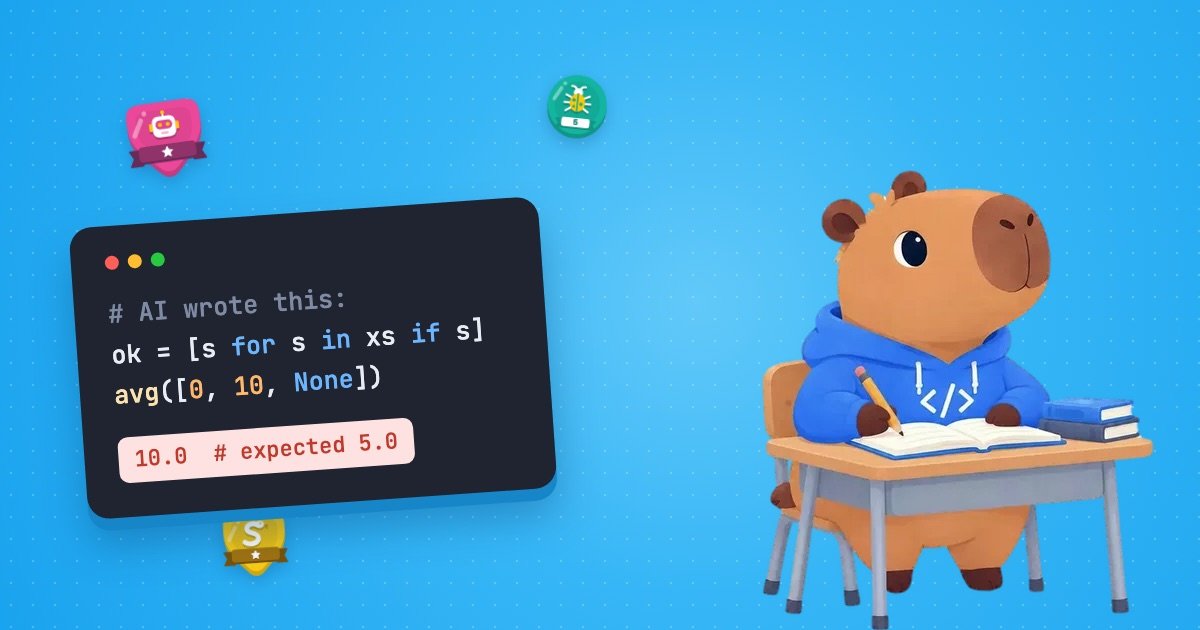
    valid = [s for s in scores if s]
    return sum(valid) / len(valid)

print(average_score([8, 6, None, 10]))
It prints 8.0, which is (8 + 6 + 10) ÷ 3, exactly right. It runs, it passes the obvious test and it reads well. Would you use it?
Try it: find the input that breaks it
One realistic list of scores makes this function return the wrong answer, with no error message at all. Find it before you open the answer. Hint: think about a student who had a really bad day.
Show the answer
A score of zero. Try two students who both scored 10 on one quiz and missed another. On the third quiz, one scored 0 and the other scored 1:
print(average_score([0, 10, None]))
print(average_score([1, 10, None]))
10.0
5.5The first answer should be 5.0. The student who scored 0 ends up with a better average than the one who scored 1. The culprit is if s. It doesn’t ask “is there a score?” It asks “does this value count as true?”, and under Python’s truth value rules both None and 0 count as false. So the function quietly throws away every zero.
There’s a second, louder problem. If every score is missing, the list of valid scores is empty and the function crashes on the division:
ZeroDivisionError: division by zeroThe fix is a more precise condition plus a check for the empty case:
def average_score(scores):
    """Return the average score, ignoring missing scores (None)."""
    valid = [s for s in scores if s is not None]
    if not valid:
        return None  # no scores at all, so there's no average
    return sum(valid) / len(valid)

print(average_score([8, 6, None, 10]))
print(average_score([0, 10, None]))
print(average_score([None, None]))
8.0
5.0
NonePython’s official style guide, PEP 8, warns about exactly this trap: don’t write if x when you mean if x is not None.
Nothing here is advanced. Catching it takes two beginner skills: knowing what a line like if s really checks, and thinking of an awkward input (zero, empty, missing) before trusting a result. Those are the reading and debugging skills that AI doesn’t remove, and debugging is where Anthropic’s study found the biggest gap between the AI-assisted group and the group that coded by hand. If tracebacks still look like small print to you, our guide to reading Python error messages walks through them line by line.
Is learning to code worth it for you?
“Worth it” means something different depending on why you’re asking. Here’s our view for four common situations, including when we think it probably isn’t.
You’re thinking of changing careers into software
This is where the honest answer has changed most. The Stanford payroll data suggests that entry-level hiring is where AI-exposed jobs are tightening. The study only looks at 22–25-year-olds, but if you’re switching careers you’ll probably be applying for the same junior roles, so it’s worth taking seriously at any age.
It can still be worth it. In our view it pays off most for people who enjoy the work after a fair trial, can plan for a longer road than the quick-switch success stories suggest, and combine code with what they already know. An accountant who can write Python and SQL, or a nurse who can automate the ward rota, brings context that a coding tool doesn’t have. It also helps to look at what each role actually involves: Codr’s career paths set out the courses behind ten roles, from web developer to data and AI analyst.
Probably not worth it if: you need a new income within a few months, your main reason is salary headlines, or you’ve given it a few weeks of regular practice and dread every session.
You want to build things or automate your own work
This is the clearest yes. Nobody has to hire you, and AI tools have made a first working version much easier to reach. GitHub’s 2026 report shows how far this now goes: by its estimate, public repositories serving health care, agriculture, construction and mining have each grown several times over since 2022, as people outside the software industry build tools for their own fields.
Knowing the basics is what turns “the AI made something that sort of works” into something you can fix, extend and trust with real data, like the quiz scores above.
Probably not worth it if: an existing app, spreadsheet feature or no-code tool already does exactly what you need. Learning to code for a task you’ll do once isn’t a good trade.
You’re a student
The basics are worth learning whatever you study, because plenty of fields beyond computer science involve working with data or automating repetitive work. If you’re aiming at a software career, treat the Anthropic result as a warning about how you study: the participants who let the assistant do the whole task were among the lowest scorers on the quiz. Your coursework is where you build the judgement that a tool can’t hand you, so use AI as a tutor rather than a ghostwriter, and follow your school’s rules on AI use.
Probably not worth it if: you’re choosing a computer science degree only because of pay headlines and don’t enjoy programming. In a tighter junior market, we’d argue the people who stand out are the ones who keep going well past the basics, and that’s hard to do with something you dislike.
You’re a parent deciding for your child
For a child, “worth it” is about literacy, not career planning. Nobody can forecast the job market ten years from now, so be sceptical of anyone selling coding as a guaranteed future job. What lasts is the thinking: breaking a problem into steps, testing an idea, finding out why it didn’t work and trying again.
Younger children can pick up those ideas through block-based tools such as Scratch (our roundup of coding games covers several), then move to a typed language such as Python when they’re ready. A project they care about, like a game or a website for a hobby, does more than drills.
Probably not worth it if: your child isn’t interested and it’s crowding out things they love. Forcing it rarely builds the persistence that coding needs.
Can you learn to code with AI? Yes, if you use it like this
The Anthropic study is the most useful guide here, because it looked at how people used the assistant, not just whether they did. The groups that scored highest (averaging 65% or more on the quiz) used AI to build understanding: they asked conceptual questions, requested explanations along with code, or asked follow-up questions about code it had written. The lowest-scoring groups (averaging under 40%) handed over the writing or the debugging entirely. The researchers are careful to say this is an association, not proof of cause, but the habits are easy to copy:
- Write it yourself first. Ask AI to review your attempt, not to replace it. Getting stuck is part of the process: the group without AI ran into more errors, and the researchers think working through those errors is what built their debugging skills.
- Ask “why”, not just “write”. “Why does this use
is not None?” teaches you something. “Fix it” mostly doesn’t. - Explain every line before you keep it. If you can’t say what a line does, keep asking until you can.
- Read the error before you paste it. Form your own guess about what went wrong, then check it with AI. Relying on the assistant to debug for you was one of the low-scoring patterns.
- Test awkward inputs. Zero, empty, missing, negative, very large. That’s how the bug above gets caught.
- Switch on a learning mode where there is one. Some AI tools now offer study or explanatory modes that are designed to explain rather than hand over answers.
With or without AI, we’d suggest short, regular sessions over occasional marathons; our ten-minute daily coding routine shows how to fit them into a busy week. If you also want to understand the tools themselves, Codr’s AI course covers prompting, machine learning, generative AI, neural networks and language models, and how to use AI wisely.
Frequently asked questions
Am I too old to learn to code?
No. Learning to program has no age limit; the research above is about hiring, not about who can learn. Getting hired is a separate question: the entry-level squeeze applies to junior roles whatever your age, but experience from another field can work in your favour once you add code to it. For building your own projects or automating your work, age doesn’t matter at all.
Which programming language should I learn first?
Pick by what you want to build: Python for automation, data and AI; HTML, CSS and then JavaScript for websites; C# for games. Our guide to the best programming language to learn first goes through each goal in more detail.
A low-risk way to find out
You don’t have to settle this in the abstract. Give it a fair test that costs you little: one small thing you’d like to build, one language that fits it, and 10–20 minutes a day for a month. Write the code yourself, let AI explain what you don’t understand, and keep a note of what you can do at the end that you couldn’t at the start. That note will answer the question better than any survey. When you’re ready to begin, our step-by-step guide to learning to code as a beginner takes you from choosing a first project to knowing when you’re making progress.